Migrating Flutter iOS from CocoaPods to Swift Package Manager with Firebase

By Youssef Salem HassanLead Software Engineer · LinkedIn
A safe Flutter iOS migration from CocoaPods to Swift Package Manager, covering plugin audits, Firebase, Crashlytics, clean CI, and rollback evidence.
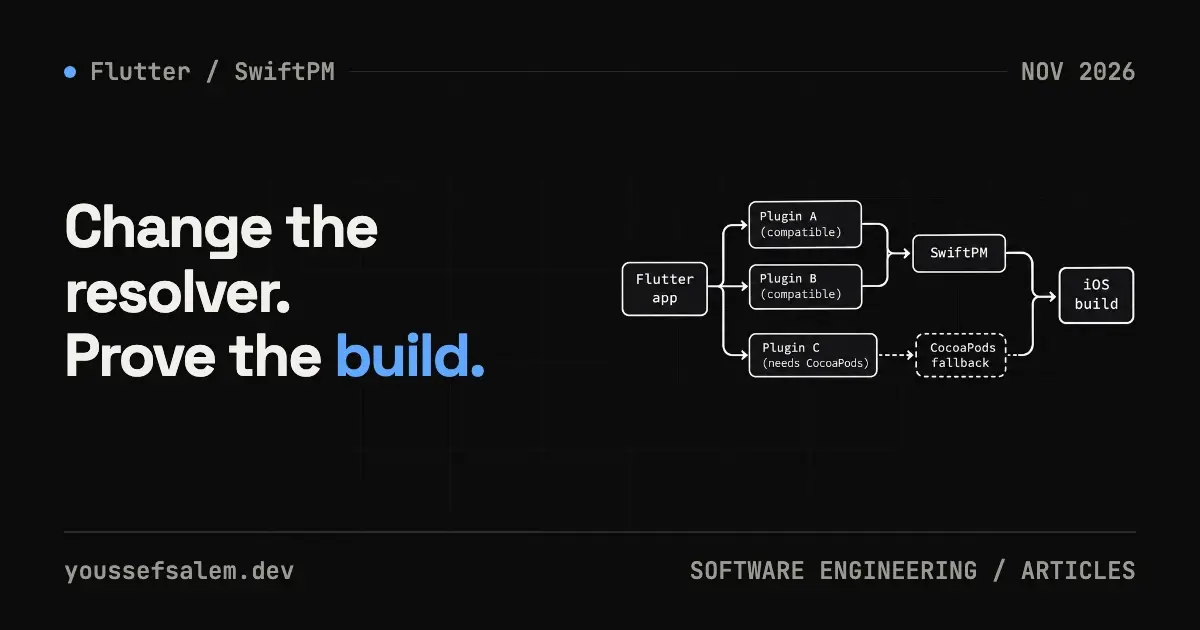
Firebase stopped publishing new Apple SDK releases to CocoaPods in October 2026. Existing pod versions remain available and apps already built with them do not suddenly stop working. However, a project that stays on that distribution path will no longer receive new Firebase features, performance improvements, or critical fixes through CocoaPods. At the same time, Flutter 3.44 made Swift Package Manager the default way to manage native iOS and macOS dependencies.
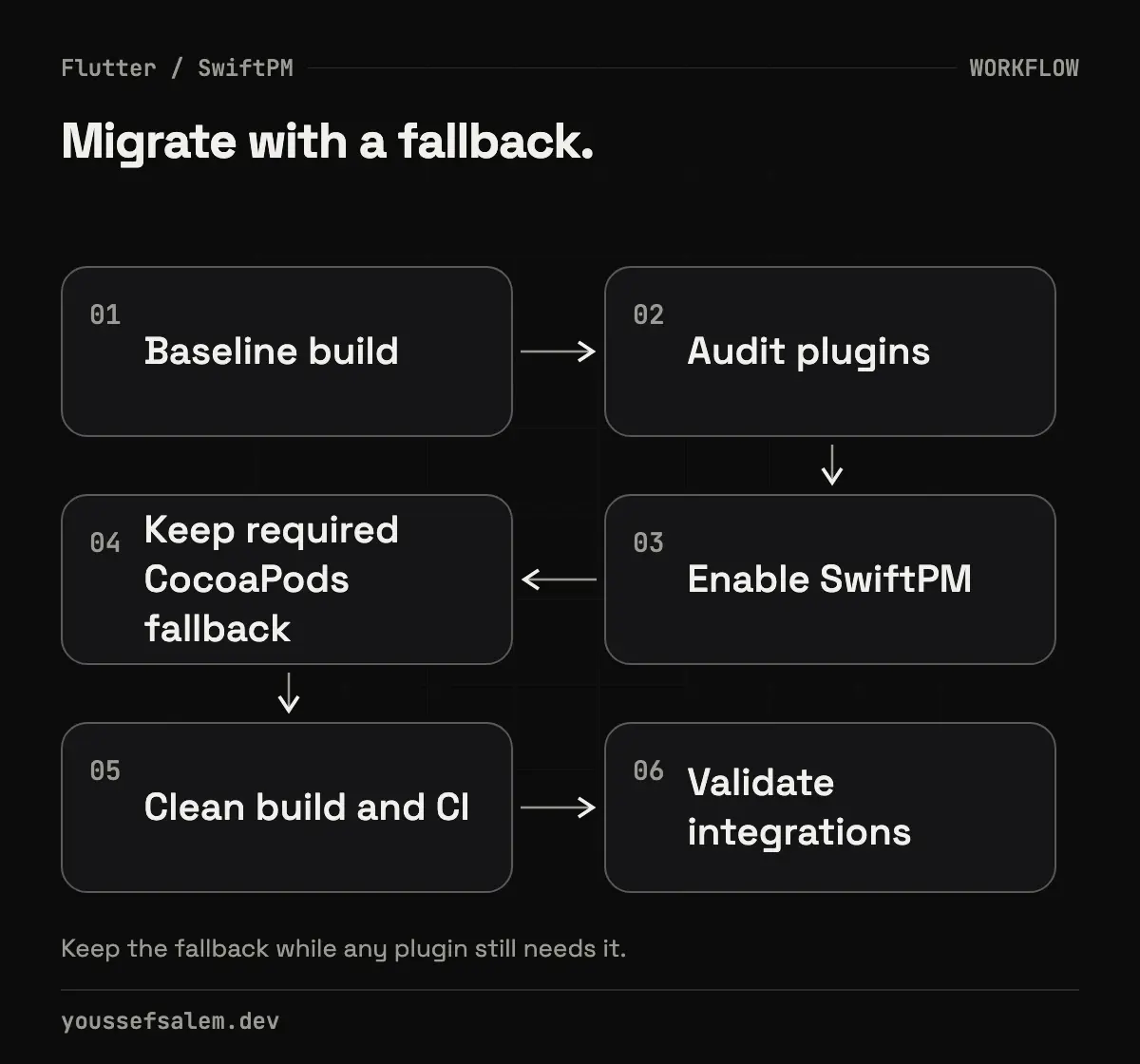
That does not mean every Flutter team should immediately delete its Podfile. A production app can contain plugins that still need CocoaPods, custom Crashlytics scripts, or payment, mapping, and VoIP SDKs with no SwiftPM package. A safe migration starts with an inventory, permits a temporary mixed state, and ends only after a clean CI build and product-level smoke tests.
What changed—and what did not?
Firebase’s official CocoaPods migration notice explains that the CocoaPods registry becomes read-only in December 2026 and that Firebase ended new releases there in October. Published versions remain available indefinitely, so this is not an immediate runtime outage. It is a maintenance boundary: the native Apple SDK beneath Firebase integrations will become frozen if CocoaPods is the only distribution path.
Flutter’s Swift Package Manager guide says SwiftPM support is enabled by default from Flutter 3.44. Upgrading Flutter and running the app adds the integration that downloads Swift packages declared by Flutter plugins. Flutter still falls back to CocoaPods when a dependency does not support SwiftPM.
Two integration patterns therefore need different treatment:
- A Flutter app using FlutterFire plugins: let Flutter manage the plugins’ native packages and audit their SwiftPM support.
- A Flutter app with native Firebase dependencies or extra iOS targets: migrate those direct Firebase dependencies inside Xcode as well.
Confusing the two paths can result in Firebase being linked twice or in removing Podfile logic that another plugin still requires.
Why this matters to an MVP or production product
The package manager is part of the release system, not just a repository preference. A rushed migration can produce:
- a build that works locally but fails in CI because Xcode versions or caches differ;
- missing dSYM uploads, leaving Crashlytics reports unsymbolicated;
- a Flutter plugin that works on Android but fails to link on iOS;
- an unexpected increase in the minimum iOS deployment target;
- duplicate symbols or frameworks because the same library is managed by both CocoaPods and SwiftPM.
Treat the migration as a release-infrastructure change. Give it a dedicated branch or pull request, documented evidence, and an uncomplicated rollback.
A step-by-step migration plan
1. Record a baseline
Start from a clean branch and capture the toolchain:
bashflutter --version
dart --version
xcodebuild -version
pod --version
flutter doctor -v
Run the current iOS build and test suite, and retain the log from a known-good build. If the app uses sign-in, push notifications, Crashlytics, Remote Config, or deep links, define short smoke journeys for them. The baseline helps prove whether a failure was introduced by the migration.
2. Inventory native dependencies
Inspect:
- pubspec.yaml for Flutter plugins;
- ios/Podfile for manually added pods, hooks, and build settings;
- ios/Podfile.lock for the resolved native dependency graph;
- Xcode’s Package Dependencies for packages already managed by SwiftPM;
- Build Phases, especially Crashlytics scripts;
- CI steps that run pod install or cache the Pods directory.
Classify each dependency as SwiftPM-ready, temporarily CocoaPods-only, or manually integrated and requiring a separate decision. Do not assume every item in Podfile.lock came directly from FlutterFire.
3. Upgrade Flutter and plugins as a focused change
Move to a stable Flutter release with default SwiftPM support, then update plugins after reviewing their changelogs and platform requirements. Avoid combining the migration with an architecture rewrite or unrelated dependency upgrades. Smaller changes are easier to diagnose and revert.
After flutter pub get, run the app from Xcode. Flutter’s official check is to confirm that FlutterGeneratedPluginSwiftPackage is a target dependency and that Run Prepare Flutter Framework Script runs as a pre-action.
4. Keep CocoaPods until nothing needs the fallback
Flutter explicitly falls back to CocoaPods when any project dependency lacks SwiftPM support. A remaining Podfile after upgrading does not automatically mean the migration failed; it may be a valid intermediate state.
Remove CocoaPods integration only when:
- every Flutter plugin in the project supports SwiftPM;
- no manually declared pod is still required;
- custom Podfile behavior has been moved to an appropriate replacement;
- simulator, device, and clean CI builds have passed.
If the iOS layer directly installs Firebase, follow Firebase’s official installation options: add the firebase-ios-sdk repository in Xcode and select only the products the native target uses. Do not manually add the native SDK on top of a Flutter plugin-managed dependency without a documented reason.
5. Recheck product-specific integration
Crashlytics
A successful link does not prove symbol upload works. Check the dSYM upload build phase and its path after Firebase moves under SourcePackages. Firebase documents the run-script location for SwiftPM installations. Use an approved non-production crash test and confirm that the report is symbolicated before merging.
Analytics
When Analytics arrives transitively, Firebase notes that the target can require the -ObjC linker flag. Inspect the current integration and official instructions rather than adding flags speculatively.
Minimum iOS version
A Swift package or Flutter plugin might require a higher platform version. Do not raise the deployment target automatically without checking the product’s supported-device policy. Flutter surfaces an explicit build error when a package requires a newer target.
Non-Firebase SDKs
A payment, maps, analytics, or VoIP SDK may still depend on CocoaPods. SwiftPM and CocoaPods can coexist during migration, but the same native library should not be owned by both.
6. Update CI and caching deliberately
Do not remove pod install from CI until the dependency audit proves no fallback remains. For a SwiftPM-first pipeline:
- pin compatible Flutter and Xcode versions;
- run at least one clean build to expose reliance on stale local caches;
- commit or manage Package.resolved according to the team’s reproducibility policy;
- cache Swift packages without sharing incompatible build outputs across Xcode versions;
- retain build logs and test reports as artifacts.
Also check signing and export steps. Changing dependency management should not silently change the app identifier, entitlements, provisioning profile, or archive/export configuration.
A reviewable migration flow
textBaseline -> Inventory -> Enable SwiftPM -> Build with fallback
         -> Remove remaining pod dependencies -> Clean CI -> Product smoke tests
The important gate is not “the Podfile disappeared.” It is “the app can be reproduced, tested, archived, and diagnosed without an obsolete dependency path.”
Pre-merge evidence
| Area | Evidence to retain |
|---|---|
| Build | Debug and Release succeed on a clean CI runner |
| FlutterFire | Smoke tests pass for the Firebase products actually used |
| Crashlytics | dSYM upload works and an approved test report is symbolicated |
| iOS runtime | Simulator plus a real-device check where available |
| Dependencies | Firebase is not duplicated across Pods and SwiftPM |
| Rollback | The previous commit builds without undocumented manual steps |
This table is an engineering recommendation, not a promise that every third-party plugin is compatible. The plugin’s current release documentation remains the source of truth for its SwiftPM support.
Conclusion
Firebase ending new CocoaPods releases does not break an existing app today, but treating the frozen path as permanent creates technical debt. On Flutter 3.44 and later, enable SwiftPM, audit plugins and native integrations, allow the documented fallback while it is needed, and remove CocoaPods only after CI and product behavior prove it is safe.
If you are planning an MVP or business application and want a reviewable Flutter architecture and iOS delivery pipeline, explore MVP app development or business app and platform development. A sound migration protects future updates; it does not by itself guarantee product quality or search rankings, which require ongoing measurement after release.
Sources
More articles
- Flutter 3.47.8 Security Update: Why Updating the SDK Is Not EnoughUnderstand the Flutter 3.47.8 and Dart 3.13.7 TLS fix, affected platforms, and why Android, Windows, and Linux apps must be rebuilt and shipped again.
- An Urgent Firebase Security Update in Flutter: Fix the Risk Without Breaking the AppA practical workflow for Firebase security updates in Flutter: prove exposure, inspect lockfiles, test native paths, and stage a safe release.
- Malicious Claude Code Extension in Cursor: How to Protect Your Development EnvironmentLearn what happened with Anthropic.claude-code 2.1.312 and 2.1.313 in Cursor’s marketplace, how to contain an affected host, and how to secure AI coding tools.