Migrating Flutter tests from Firebase Test Lab before shutdown: a practical plan

By Youssef Salem HassanLead Software Engineer · LinkedIn
A practical plan to move Flutter testing from Firebase Test Lab to Developer Device Platform before September 30, 2027, without disrupting CI.
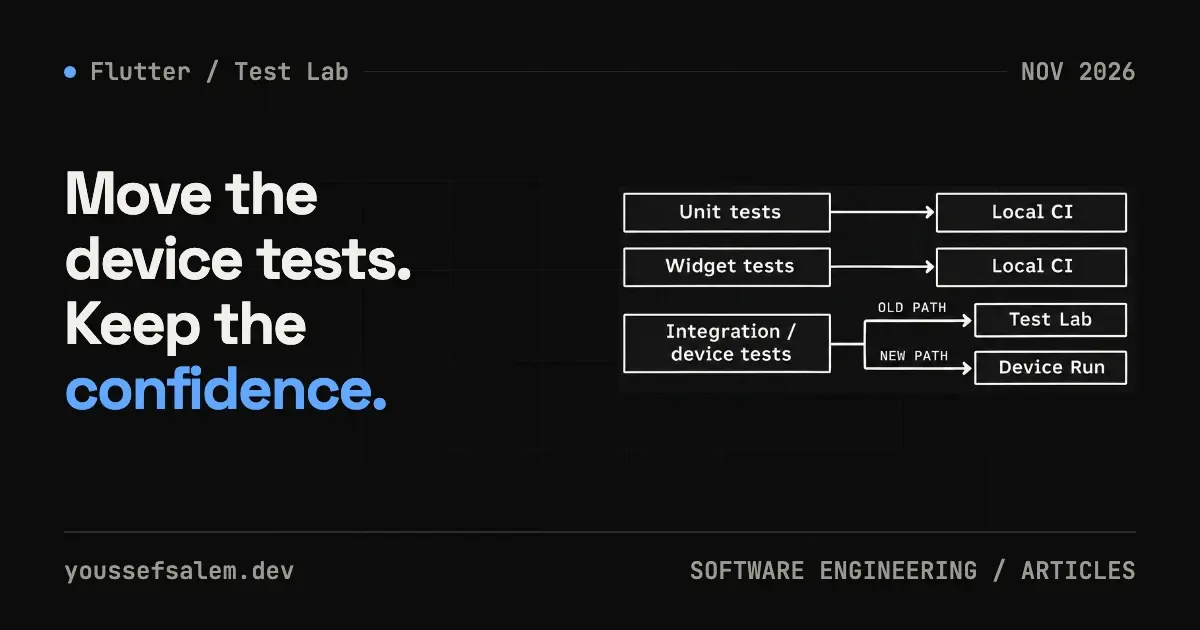
Google has announced that Firebase Test Lab is deprecated and will shut down completely on September 30, 2027. Teams are being directed to move testing workflows to Google Cloud’s Developer Device Platform (DDP). Your tests will not stop today, but CI commands, device matrices, result storage, and failure diagnostics now deserve an early review.
For a Flutter app, the safest response is not to move every test into a new cloud service. Keep a sensible testing pyramid in the repository, migrate only the layer that needs hosted devices, and run the old and new paths side by side before switching. The goal is to protect releases while a new toolchain matures.
Status note: DDP is in Preview at the time of writing. Its Android commands use gcloud beta device-run, and the iOS XCTest command is on the alpha track (gcloud alpha device-run sessions submit xctest). Validate fit, pricing, support, and operational behavior before making them your only release gate.
What actually changed?
Google’s official deprecation FAQ says Test Lab executions remain supported until September 30, 2027. After that date, the Test Lab console and API will be shut down. The stated replacement is Developer Device Platform, which includes Device Run for automated tests and Device Streaming for interactive access to remote physical Android devices.
The official migration guide says the Preview supports Android Instrumentation and iOS XCTest. The command shape changes from:
bashgcloud firebase test android run --type=instrumentation ...to a session-oriented interface:
bashgcloud beta device-run sessions submit instrumentation ...This is more than a rename. Devices, software versions, and sessions are separate resources. A session can be submitted asynchronously, waited on, described, listed, or cancelled. Several flags and semantics differ too, so changing the command prefix without reviewing the workflow is risky.
Start with the test pyramid, not the device provider
Flutter’s documentation separates automated tests into unit, widget, and integration tests. It recommends many unit and widget tests plus enough integration tests to cover important use cases, because integration tests carry higher execution and maintenance costs.
That guidance matters during migration. A practical split is:
- Unit tests: domain rules, BLoC or Cubit state transitions, mapping, and validation.
- Widget tests: loading, error, and data states; RTL; multiple sizes; and baseline accessibility.
- Local integration tests: a short journey such as sign-in or order creation on Android Emulator and iOS Simulator.
- Cloud-device tests: flows sensitive to real hardware, OS versions, cameras, notifications, permissions, or performance.
One Flutter-specific limitation needs an explicit design decision: the SDK’s integration_test package cannot interact with native platform UI such as permission dialogs, notifications, or platform views. The Flutter docs point to Patrol when native interactions are required. Migrating the cloud provider will not fix a test that targets the wrong automation layer.
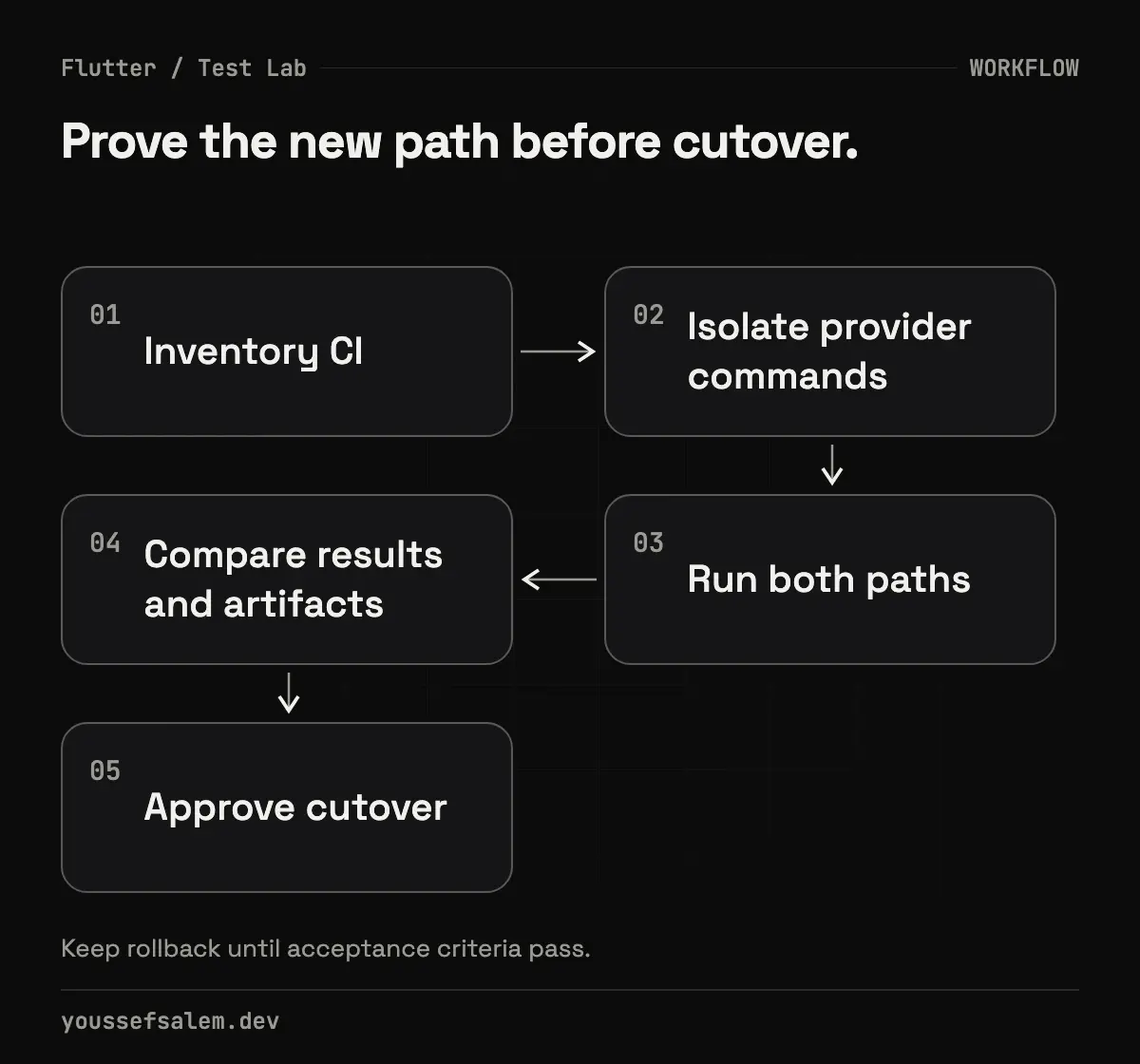
A six-step migration plan
1. Inventory the current workflow
Search CI definitions and scripts for gcloud firebase test, Flank configuration, device names, APK or IPA artifacts, and result paths. Record for each job:
- platform and test type;
- devices, OS versions, locale, and orientation;
- environment variables and additional files;
- timeout, sharding, and retry behavior;
- video, log, JUnit, and other artifact destinations;
- the exact pass/fail rule used by CI.
This inventory becomes the baseline for DDP. Without it, a migration can look successful while silently dropping a device, diagnostic artifact, or release condition.
2. Reduce the matrix to decisions that matter
A huge matrix on every pull request creates slow feedback and noisy failures. Use tiers instead:
- on each change: unit, widget, and one fast integration target;
- before merge or nightly: a broader range of Android versions and screen profiles;
- before release: real devices that represent the highest risks, plus iOS coverage where required.
Device selection should follow product usage and risk rather than an ambition to test every combination. For a Saudi-facing product, Arabic and RTL, weak connectivity, and identity or payment journeys may deserve explicit coverage—when those features actually exist in the app.
3. Separate test intent from provider commands
Put cloud commands behind a small script or a stable CI job such as cloud_device_smoke. Make the app artifact, test artifact, suite, matrix, and results directory explicit inputs. The provider adapter can then change from Test Lab to Device Run without rewriting the rest of the delivery pipeline.
For example, this is a configuration shape, not a universal ready-to-run command:
yamlcloud_device_smoke:
  platform: android
  app: build/app/outputs/apk/release/app-release.apk
  test: build/app/outputs/apk/androidTest/release/app-release-androidTest.apk
  devices: ["DEVICE_ID_FROM_CURRENT_CATALOG"]
  artifacts: "test-results/device-run"
Resolve real device IDs and supported flags from the current catalog and official documentation. They are not project-independent constants.
4. Translate commands and review semantics
Google provides an official command and flag translation guide. Pay particular attention to:
- sessions submit instrumentation and sessions submit xctest;
- the plural --apps input;
- --paths-to-pull for retrieved files;
- retry semantics, because a Test Lab retry count may map to a different total-attempt value in DDP;
- Cloud Storage output and CLI/API-based session inspection.
Version the translated configuration with the application. Avoid hiding the complete invocation in a UI-only setup that reviewers cannot inspect.
5. Run both paths in parallel
Choose one short smoke test and run it on Test Lab and DDP for a limited period. Compare status, duration, logs, video, failure classification, artifacts, and rerun behavior. This is a recommended analysis method, not a claim that the two services are equivalent. The comparison reveals differences specific to your app and CI environment.
Because DDP is still in Preview, begin with a non-blocking job. Promote it to a required release gate only after the team understands reliability, support boundaries, and failure recovery.
6. Define cutover and rollback conditions
Write measurable exit criteria: critical journeys pass, artifacts are retained, CI surfaces failures correctly, failed cases can be investigated or rerun, and permissions and costs are understood. Keep the Test Lab path available until those conditions hold, then remove the legacy dependency well before the shutdown date.
Also define ownership. Someone should know who updates the device catalog selection, reviews flaky tests, rotates credentials, and responds when the Preview interface changes.
A release gate that remains useful after migration
A healthy gate answers four questions:
| Question | Evidence |
|---|---|
| Did business logic remain correct? | Unit and BLoC/Cubit tests |
| Did key screens behave correctly? | Widget tests across states, sizes, and RTL |
| Did the primary journey work end to end? | Integration smoke test |
| Did platform-sensitive behavior work on representative hardware? | Small cloud-device matrix with retained artifacts |
This structure makes failures easier to locate and keeps cloud-device spending attached to tests that need it.
Testing, SEO, and product quality are separate concerns
Better test coverage reduces regression risk only within the scenarios you wrote. It does not prove overall product quality, so production crashes, performance, user feedback, and conversion metrics still matter.
Likewise, optimizing this article’s title, structure, and links can improve clarity and discoverability, but indexing depends on technical SEO, crawl access, sitemaps, and canonical configuration. Search performance must be measured over time in Search Console; rankings cannot be guaranteed.
Conclusion
September 30, 2027 leaves time, but early migration turns a deadline into a controlled engineering task. Stabilize the Flutter test pyramid, inventory Test Lab dependencies, isolate provider-specific commands, and compare DDP using one small workflow. Only then make the new path release-critical.
If you are planning an MVP or a business application and need a reviewable Flutter delivery pipeline, explore MVP app development or business app and platform development and define a testable scope before implementation.
Sources
More articles
- Flutter 3.47.8 Security Update: Why Updating the SDK Is Not EnoughUnderstand the Flutter 3.47.8 and Dart 3.13.7 TLS fix, affected platforms, and why Android, Windows, and Linux apps must be rebuilt and shipped again.
- An Urgent Firebase Security Update in Flutter: Fix the Risk Without Breaking the AppA practical workflow for Firebase security updates in Flutter: prove exposure, inspect lockfiles, test native paths, and stage a safe release.
- Malicious Claude Code Extension in Cursor: How to Protect Your Development EnvironmentLearn what happened with Anthropic.claude-code 2.1.312 and 2.1.313 in Cursor’s marketplace, how to contain an affected host, and how to secure AI coding tools.